Hi, how can we help?
Where Is My Purchase Code?
Step-by-Step Guide: How to Easily Find Your Purchase Code on DevMkr.com
If you’re looking to access your purchase code on DevMakr.com, you’ve come to the right place. This step-by-step guide will walk you through the process quickly and easily.
Step 1: Access Your User Dashboard
First, log in to your account on DevMakr.com. Once logged in, you’ll be directed to your user dashboard. This is your central hub for managing your account and purchases.
Step 2: Navigate to Purchases
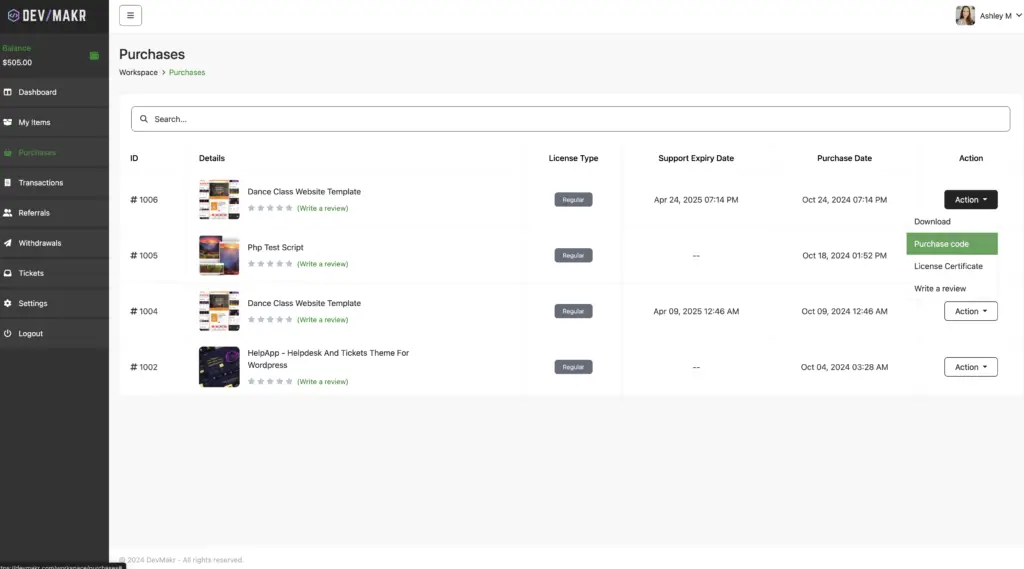
On the left side of your user dashboard, you will find a user menu. Locate the menu item labeled “Purchases” and click on it. This will take you to a list of all the products and services you’ve purchased from DevMakr.com.
Step 3: Find the Action Menu
Within the Purchases section, you’ll see an action menu next to each item you’ve bought. This menu provides various options related to your purchase.
Step 4: Select Purchase Code
Click on the action menu for the specific purchase you’re interested in. From the dropdown options, select “Purchase Code.” This will display the unique code associated with your purchase.
Conclusion
Finding your purchase code on DevMakr.com is a straightforward process. Just follow these simple steps: go to your user dashboard, navigate to Purchases, click the action menu, and select Purchase Code. With this guide, accessing your purchase code is a breeze, ensuring you can manage your purchases efficiently.